Here at Softlay, we are providing you a download link to the original untouched free download of the Microsoft Office 2013 offline installer setup file for Windows PCs.
⭐
4.6
754
reviews
54211
downloads
Microsoft Word 2013 for Windows is a powerful word processor that is a part of the Microsoft Office 2013 software suite. It excels at creating documents of a professional caliber while yet being user-friendly for beginners and students. You can also get this version of MS Word 2013 for laptops if it is running Windows OS.
MS Word 2013 is no longer officially available as a standalone download. Here at Softlay, we are providing you a download link to the original untouched free download of the Microsoft Office 2013 offline installer setup file for Windows PCs. Also given below is a guide on how to install Word 2013 as a standalone product through this Office 2013 setup.
How to Download and Install Word 2013
Here’s how you can download and install Word 2013 as a standalone app:
Step 1: Download the setup for Word 2013 from the top of this page and launch it.
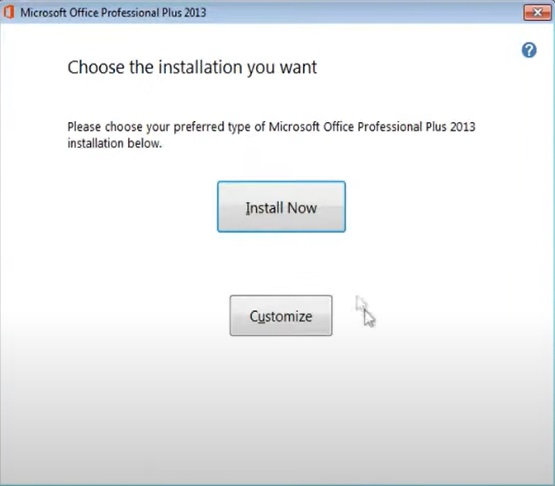
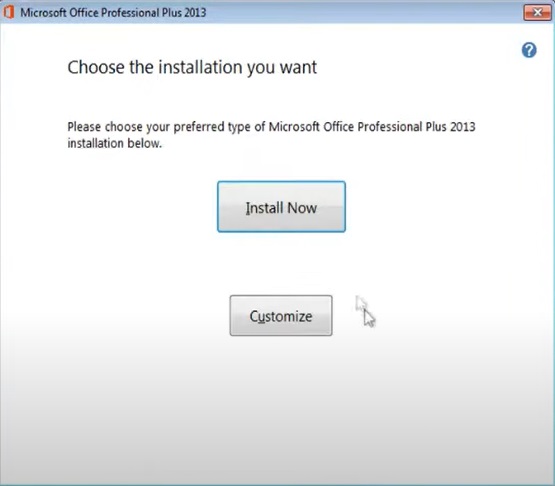
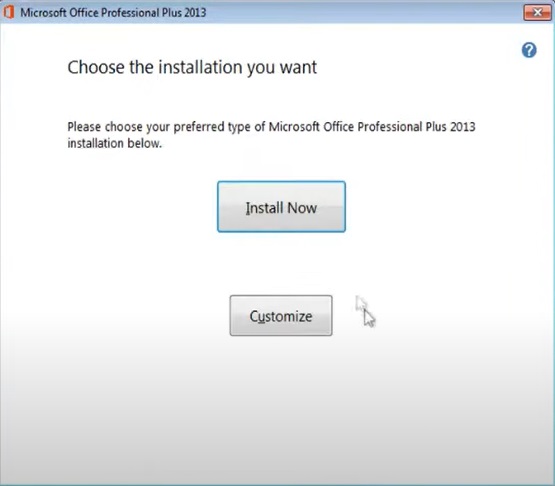
Step 2: When you get to the step below, click on “Customize” instead of Install Now.
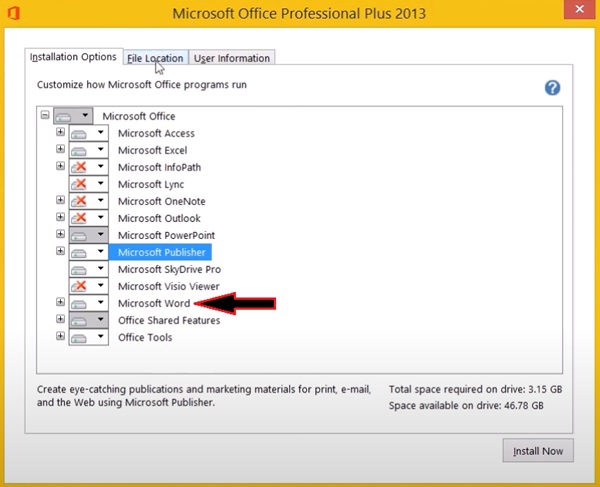
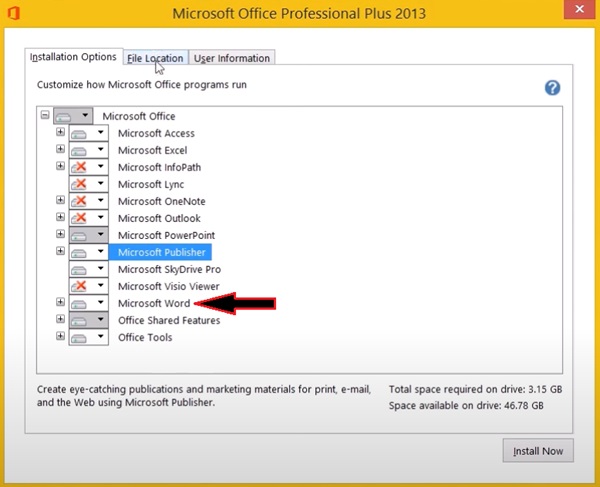
Step 3: Now unselect all the other apps that you don’t need except MS Word 2013 and click on “Install Now“.
Step 4: You have now successfully installed Word 2013 as a standalone product.
Features of Microsoft Word 2013
Please keep in mind that this list given below does not mention every feature but instead only highlights some of the more notable features introduced in Microsoft Word 2013 compared to the previous Word 2010 version.
User Interface:
- Ribbon: Redesigned interface with contextual tabs and groups for organized access to formatting and editing tools.
- Quick Access Toolbar: Customizable toolbar for frequently used commands.
- Welcome Screen: Improved welcome screen with easier access to templates and previews for new blank documents
Collaboration and Cloud Integration:
- Limited co-authoring: Enables basic real-time collaboration through Office Web Apps (requires separate installation).
- SkyDrive integration: Save, access, and share documents online easier than ever with SkyDrive (now known as OneDrive).
Document Creation and Editing:
- Templates: Wide variety of pre-designed templates for various document types.
- Styles and themes: Apply consistent formatting and branding across documents.
- Tables and charts: Create and edit tables and charts with ease.
- Read Mode: Immersive reading experience with minimal distractions.
- PDF support & editing: Edit content within PDF files directly in Word or convert Word documents into PDFs while keeping the original formatting.
- Expand/Collapse: Collapse and expand sections of the document for better navigation.
- Online Videos: Embed and play online videos within documents.
Review and Proofreading:
- Grammar and spell check: Identify and correct grammatical errors and typos.
- Track Changes: Monitor and accept/reject revisions made by collaborators.
Additional Features:
- Mail merge: Create personalized mass mailings and documents.
- Document protection: Secure documents with passwords and restrict editing permissions.
- Accessibility features: Supports various accessibility tools for users with disabilities.
- Touchscreen Support: Word 2013 is the first version of Microsoft Word to support touchscreen devices.
Alternatives
If for any reason you’re unsatisfied with the free version of Microsoft Word 2013 then try out these alternatives:
- Microsoft Office Excel Online
- Microsoft Word 2010
- Microsoft Word 2016
- Microsoft Word For Mac
- WordPad
- LibreOffice (Free & Open-Source)
- WPSOffice (Free Basic Version)
- OpenOffice (Free & Open-Source)
- OnlyOffice (Free & Open-Source)
FAQs
What is Word 2013?
Microsoft Word 2013 allows users to create, edit, and format professional documents, incorporating a range of features for collaboration and online storage with SkyDrive integration.
While it lacks the continual updates and the advanced cloud-based features of its successor Word 2016, the 2013 version remains a robust option for crafting and sharing polished documents in an offline environment.
How to Download Word 2013?
You can download the offline installer for this app from the top of this page. There are also instructions provided on how to install it as a standalone app if you’re interested in that.
Is Word 2013 free to download?
No, you’ll only download a trial version of Word 2013.
Microsoft Word Latest Version 2013 (32/64-bit) Old Version Update
PDF Import feature in Microsoft Word Improved text wrapping and improved Track Changes feature in Microsoft Word Flash Fill in Microsoft Excel Office Remote/Microsoft PowerPoint Remote app and Office add-in to control presentations from a Windows Phone or Android phone. Automatic slide resizing/refit in Microsoft PowerPoint New Office Open XML-based format, VSDX for Microsoft Visio Flatter look of the Ribbon interface and subtle animations when typing or selecting (Word and Excel) A new visualization for scheduled tasks in Microsoft Outlook Remodeled start screen. New graphical options in Word.
Additional Information

License
Free

Version
2013 Old Version

Update
Jan 29, 2013

Size
718 MB

Requires
Windows 7, 8, 10 PC

Developer

Downloads
54211