
Extreme Injector for PC is a small utility that allows you to add a DLL library to a specific process.
⭐
4.5
91
reviews
925
downloads
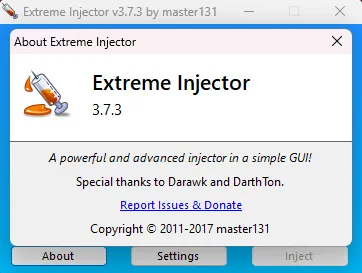
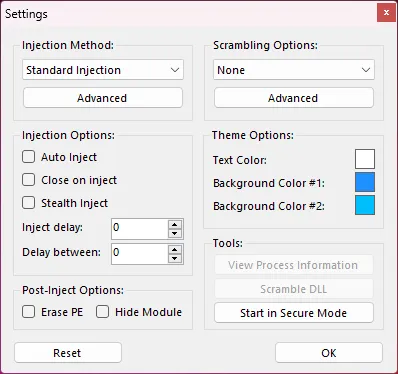
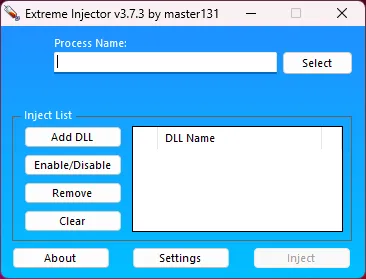
Extreme Injector for PC is a small utility that allows you to add a DLL library to a specific process. The program automatically compiles a list of active processes and performs an “injection” in just a couple of clicks. Its main purpose is to mod Roblox and Minecraft games.
Certain PC games, like Far Cry 4 or FIFA 18, cannot be easily modified using conventional trainers. Instead, these games require a different approach, such as substituting DLLs (dynamic-link libraries).
How To Use Extreme Injector on Windows 11 & 10 PC
Follow these steps:
- Download and install Extreme Injector on your computer.
- Launch Extreme Injector by running it as an administrator.
- Ensure that your computer has the .NET Framework 4.0 component installed.
- Click on the “Add DLL” button in Extreme Injector to select the necessary DLL files. You can select multiple DLL files at once.
- The selected DLL files will appear in the window to the right of the function keys.
- Identify the game process you want to inject the DLL files into. Use the “Select” key in Extreme Injector to browse and choose the process. For example, if you want to inject DLLs into Far Cry 4, you would select the farcry4.exe process.
- Once you have selected the desired process, click on the “Inject” button in Extreme Injector.
- Extreme Injector will start its injection process, implementing the selected DLL files into the chosen game process.
Extreme Injector is compatible with OS versions Windows 11, Windows 10, Windows 8, and Windows 7, both 32-bit and 64-bit. Extreme Injector for Windows supports a wide range of platforms and applications, including games, software, and system processes.
Its features include process injection, dynamic link library (DLL) injection, stealth mode, custom parameter passing, and manual mapping. With these capabilities, Extreme Injector empowers users to experiment, debug, and personalize their software experience.
Extreme Injector Download For Windows PC Info
- Disable your anti-virus/firewall if you can’t download it! Due to the nature of the app (Obfuscation, game manipulation, etc), it’s falsely marked as a virus/malware. This tool will reliably prevent Windows Defender from automatically turning itself back on.
- In some browsers like Google Chrome, there is a “Safe Browsing” setting that blocks certain downloads.
- Most apps like these break every week. Make sure to keep it updated to receive new fixes.
- Use a VPN if an app is failing to connect to the internet for assets or updates.
- Have issues injecting your DLL(I.e. attaching an exploit)? Try installing Visual Redistributable.
- DLL-only apps like this may require a DLL injector.
- We are currently offering content for Windows PCs.
- Most software found here will work fine on both 32-bit and 64-bit operating systems(Windows 7+).
- See “Unsecure Connection” error? A firewall, your ISP, or your modem/router is blocking the download. A VPN may solve this.
Extreme Injector Latest Version 3.7.3 Update
Fixed leaky handle from WOW64 checks (#10)
Fixed manual map support for Windows 10 Fall Creators Update
Fixed crashing when injector is run with .NET Framework 4.7
Added manual map support for Windows 10 Insider Preview Build 17004
Fixed manual map and LdrpLoadDll support for Windows 10 Creators Update
Fixed critical bug relating to imports resolution (issues when the same module is imported multiple times)
Fixed bug that led to many handles being opened unintentionally
Migration of Visual C++ resources and version checking to GitHub for more transparency
Additional Information

License
Free

Version
3.7.3

Update
Apr 17, 2023

Size
1.88 MB

Requires
Windows 11, 10, 8, 7 PC

Developer

Downloads
925