

The best free utility to compress, encrypt, and Backup files with only one click.
⭐
4.6
32
reviews
25412
downloads
WinRAR for PC is a free-to-download and-try app (40-day trial version) that lets you compress and extract files in a very easy, quick, and efficient way. Once the trial period is over the program will prompt you to purchase the full version every time you launch it but not enforce it, meaning you can continue using it for free.
Once you download WinRAR and install it, it’ll automatically integrate itself into the right-button context menu of your operating system for easy access, so you can create and extract compressed files (RAR, ZIP, etc) with ease.
WinRAR for Windows is the world’s most popular file compression tool that you can use to compress files efficiently. It was created by the same developers who developed the .rar file format. RAR files are the native format for this software and can only be created via it.
RAR for Mac and Linux is available only in the Command Line version.
If you’re wondering what is Command Line then here’s the answer according to the RAR team.
“Command line is a text interface for your computer that takes commands and passes them on to your computer’s operating system. It is fully text-based.“
How To Download and Install WinRAR on Windows?
WinRAR Download for PC is available/supported for/by Windows XP, Vista, Windows 7, Windows 8, Windows 10, and Windows 11. You can choose to download WinRAR 64 bit or 32 bit depending on what version your Windows is. Its free download is also available for Android OS.
Follow the instructions below to download and install it in no time:
Step 1: To start the download click on the Free Download button at the top of this page and launch the installer after it is downloaded.
Step 2: Choose the installation location by clicking Browse (optional) and click Install.
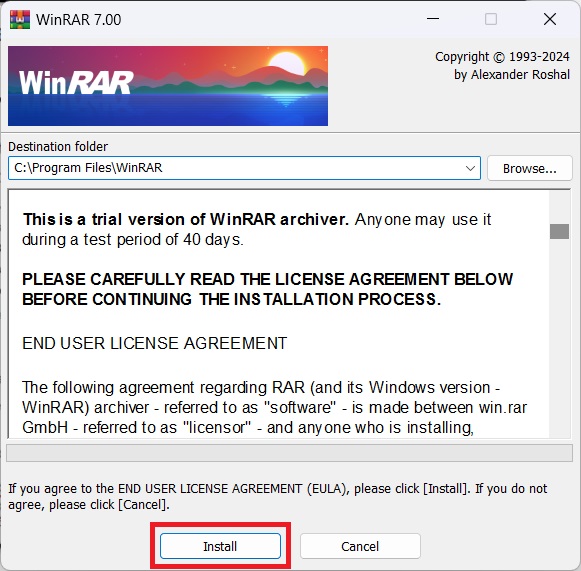
Step 3: Choose the extension types that the program will associate with or let the settings remain at default and click OK to begin the installation.
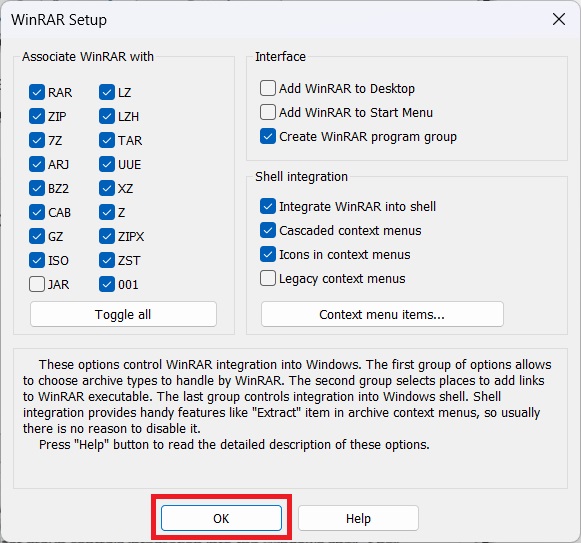
Step 4: It is now installed on your PC and you can start using it to compress and extract files.
What is WinRAR? And Why You Need it in 2025
WinRAR is more than just a utility tool that can compress and extract files. You can create archives in RAR, RAR4, ZIP formats, encrypt files, and more. With everything it can do, it’s a surprisingly easy-to-use, intuitive program that doesn’t require any technical knowledge whatsoever.
The download of the app is free for all but the only limiting factor is that the full application is only available on the Windows and Android platforms.
Features:
- Compression – RarLab’s products are considered the best and fastest compression tools on the market. RAR or Zip your files, to protect, organize, and share them safely and securely.
- Encryption – Military-grade AES 256-bit encryption technology that password protects archives including all metadata.
- It provides complete support for RAR and ZIP archives and can unpack and convert CAB, ARJ, LZH, TAR, GZ, ACE, UUE, BZ2, JAR, ISO, XZ, Z, 7-Zip archives
- RAR Files – This is the only software that can create RAR archives and offers several advanced features such as multi-volume archives, tight compression, and a recovery record.
- Password Manager – Integrated password manager assists in keeping track of difficult and hard-to-remember passwords for password-protected archives.
- Perpetual License – Perpetual license model, valid for a lifetime. No subscription.
- Recovery Record – Products are designed to recover damaged files.
- Split Archives – Split archives into smaller, more manageable files.
- Backup – Advanced backup options, time-stamped files, and previous file version retention.
- Drag-and-drop – Fully supported drag-and-drop functionality.
- Language Version – Available in over 40 languages.
- Virus Scan – Built-in virus scanner prevents corrupted archives from being unpacked.
- Multi-volume Archives – Complete support for multi-volume archives and the creation of self-extracting (SFX) archives.
- Unicode – Supports Unicode file names.
- Compliance – Admin controls allow complete control over passwords, prevent accidental modification of archives, and protect data.
WinRAR Review: Powerful Compression Made Easy

Microsoft has a built-in tool to extract and compress files in Windows 7/10/11 but it cannot manage RAR files, which just so happens to be one of the most commonly used file formats of compression which can be attributed to the popularity of WinRAR.
This is where this tool plays a pivotal role because it’s a hub for file management. This tool supports multiple file formats and is also available in over 50 languages.
Here’s our review of WinRAR after testing it rigorously.
Fast, Efficient, and Secure Compression Capabilities
It boasts a powerful compression engine that significantly reduces file sizes and does it surprisingly quickly depending on your PC hardware. For this test, we are running a combination of a Ryzen 5600x CPU paired with 32 GB RAM and 1 TB of Samsung 980 Pro SSD. Your hardware might yield different results but here are the results on our end:
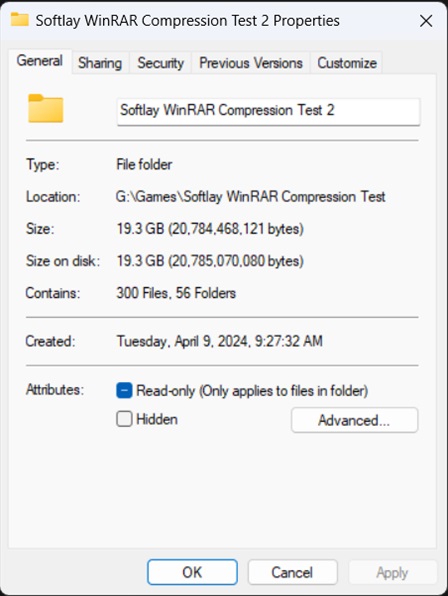
The folder on which we tested it’s compression was originally 19.3 GB in size containing 300 files and 56 subfolders.
The Archive Format was set to “RAR” and the Compression Method to “Best” for the best results possible.
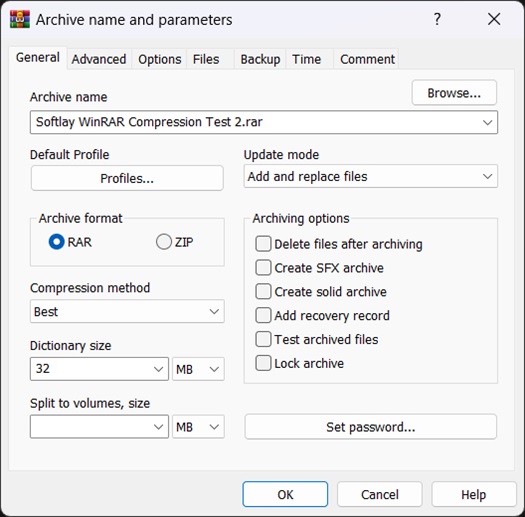
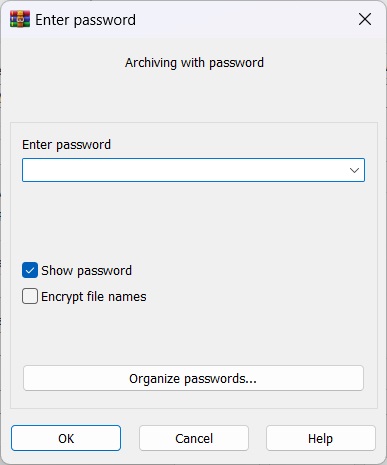
This is also the step where you can set a password to your archive using the AES 256-bit encryption by clicking on “Set password“, this military-grade encryption will ensure that your archives remain safe and are not tampered with without the proper access.
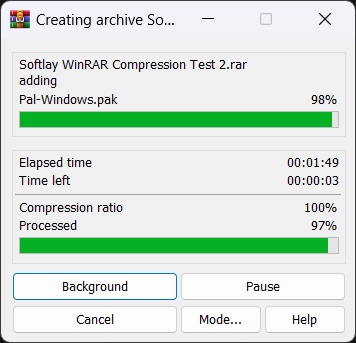
The total time taken for the compression was around the 1 minute 50 seconds mark for our PC which is fairly quick and had us surprised. This also depends on your PC hardware and the type of files that are being compressed.
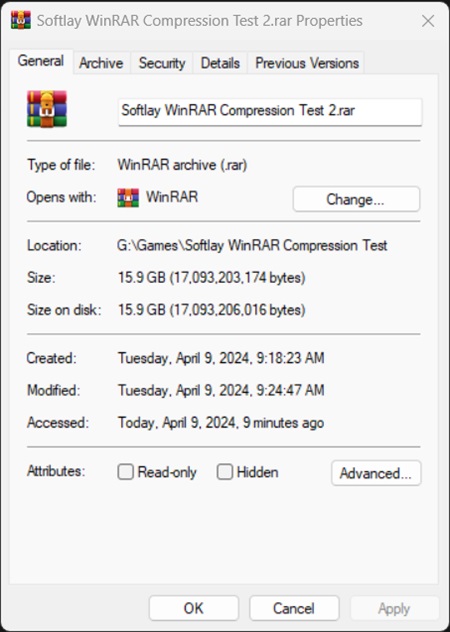
The final size of the archive after compression was 15.9 GB which is a whopping 3.4 GB less in size than the original folder and all of this was possible in just under 2 minutes which is the fastest and most efficient compression that we have seen so far in our tests with similar software.
User-Friendly Interface and Integration with Windows:
WinRAR’s interface is intuitive and user-friendly, even for beginners. You can also change the default theme, many more are downloadable from the official Themes page on the RARLAB website. To visit it click on this link. To change the theme all you need to do is click on Options > Themes. From here you can select the active theme or add newly downloaded ones via Organize Themes option.
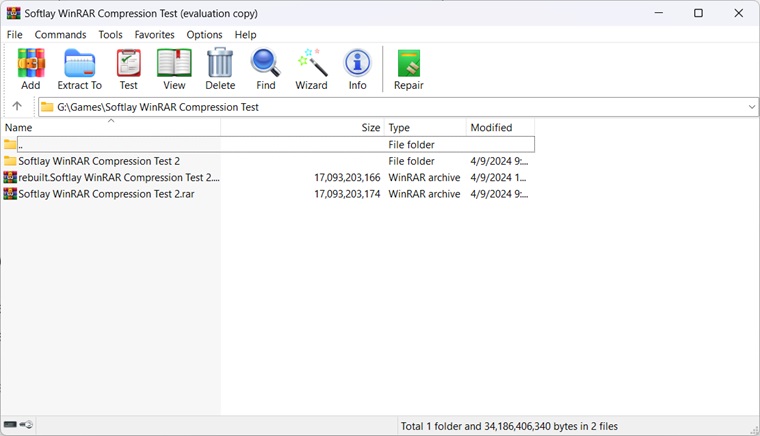
Win RAR’s well-organized layout allows you to quickly locate the functionalities you need. Take a look at the image below and see how well-sorted things are in Win RAR’s UI, with a single click you can extract the archive, add files to the archive, delete it, test the archive, and even repair it. The Win RAR repair feature is the first of its kind that can salvage the uncorrupted parts of the archive and potentially save you from a big headache.
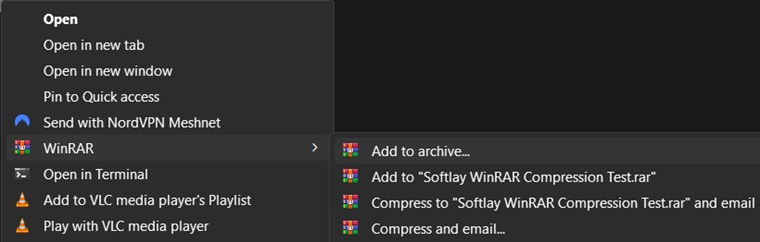
Win RAR also integrates automatically into the Windows context menu so you have quick and easy access to compress, extract, and email archives directly from the home screen without needing to enter the app itself.
Split Volume Archive Creation
When you’re creating an archive you can also select the split the archive into multiple volumes option so it is possible to save them on several disks.
This option came in handy multiple times for us when we had to transfer a large amount from one PC to another and our transferring disks lacked the total space so we were able to split the archive into many volumes and then extract all of them together whenever we needed. This is another option that we did not opt for.
Pricing
WinRAR only offers pricing options based on the number of users that are going to be using the application. If the number of users allowed is 1 then only 1 PC can have access to that copy of the tool. Options for multiple PCs are also given and keep getting cheaper as the number of users increases. See the picture below for further details.
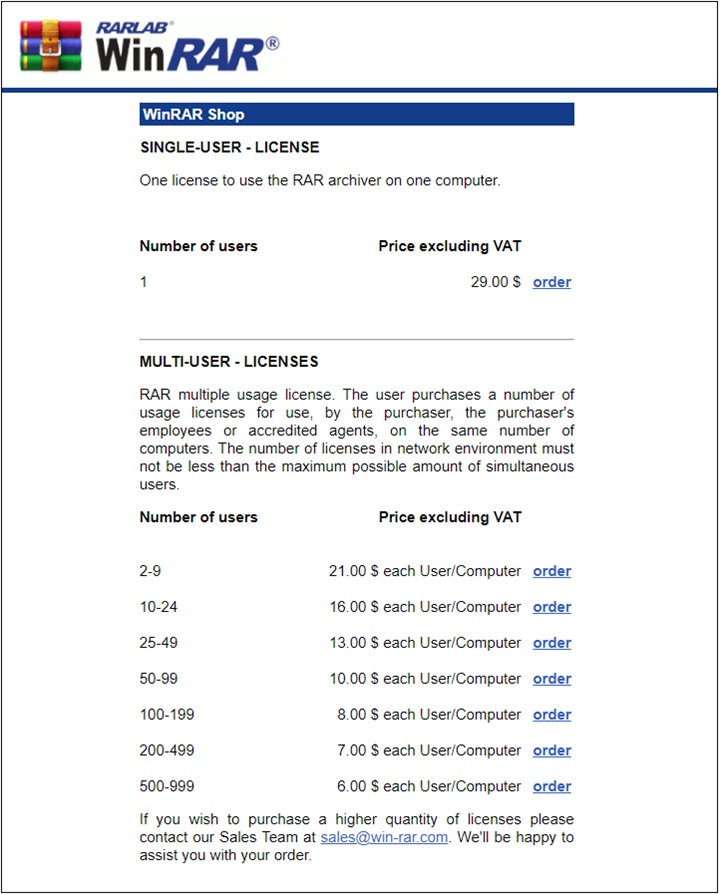
The pricing options are quite attractive and cheaper when compared to WinZip, but the downside is that WinRAR does not offer any money-back guarantee. Not that you’d need it anyway because you’re able to test every feature of the app for free before purchasing it but still having that option would be a solid plus.
To purchase WinRAR click on the picture above to be redirected to their RarLab’s official store.
Alternatives
WinZip, 7-Zip, and PeaZip are the best alternatives to WinRAR. WinZip is available as a free trial and as a paid version. However, if you are looking for a free file compression program like WinRAR then you can’t go wrong with either 7-Zip or PeaZip. However, keep in mind that both of these software can open and extract files that are in RAR format but cannot compress data into this.
FAQs
Can I download WinRAR for free?
You can download it for free but only for a trial period of 40 days, after which you will be reminded to buy a license every time you launch it. However, you can continue to use it for free as long as you wish without buying it by simply closing the prompt.
We highly recommend that you purchase it because it does its job like no other software out there and costs only a small price of 29.99$ for lifetime access.
Is WinRAR safe?
We tested it on Virus Total and the installer was clean in 68 antivirus programs.
You can use this tool without any worry as no malicious or virus is ever detected in this tool.
Does Windows 10 have any compression tool pre-installed?
Windows 10 and Windows 11 have a built-in utility but it isn’t efficient or fast, neither can it handle the RAR file format.
Hence why you need to download and install it on your Windows PC, as a cherry on top it supports nearly all major Windows versions and editions so you won’t encounter any issues in that department.
WinRar Latest Version 7.0 (32/64-bit) Update
Both file and folder modification timestamps are restored when unpacking TAR and TAR based archives like tar.gz and tar.bz2. Previously only file modification timestamps were set for these archive formats.
Added decompression of .tar.zst archives with dictionary exceeding 128 MB. WinRAR 6.20 allowed such dictionary for .zst, but not for .tar.zst.
Switches -ed and -e+d are also supported by ZIP archives. Previously they worked only for RAR archives.
Bugs fixed:
If unencrypted file was stored after encrypted in the same RAR archive and both files had been unpacked in the same extraction command, WinRAR 6.20 failed to unpack the unencrypted file;
In some cases a wrong detailed reason of file open error could be displayed in the second line of open error message.
Additional Information

License
Free

Version
7.13

Update
April 09, 2024

Size
3.6 MB

Requires
Windows 11, 10, 7 (32/64-bit PC)

Developer

Downloads
25412